


Industry
Technology
Challenge
Grover's sales team was drowning in Salesforce's slow, complex processes that couldn't keep up with their fast-growing tech rental business.
Results
Through Thalox’s structured 60-day process for migration and implementation from Salesforce to HubSpot, we successfully transformed their entire B2B sales operation. This was followed by an additional 30-day hypercare phase focused on hands-on training and dedicated support, ensuring a smooth transition. The result: 100% user adoption of HubSpot Sales Pro, with sales reps praising the platform as “much easier and more intuitive than Salesforce.”
Key Product
HubSpot Sales Pro, HubSpot Service Enterprise

Grover
Grover is a technology rental platform that's changing how businesses and consumers access tech. Instead of purchasing expensive equipment entirely, users can rent smartphones, laptops, VR gear, and other devices on a monthly basis. This flexible approach not only makes technology more accessible but also supports a circular economy by refurbishing and reselling returned devices, significantly reducing e-waste.
The Challenge
Grover's sales team was struggling with Salesforce. While they used it for sales management alongside their Admin Panel (which stored all contract and rental device information), Salesforce wasn't keeping up with their needs.
The main issues:
- Poor user experience - Grover felt Salesforce was difficult to use and not intuitive, which slowed down the sales processes and made adoption across the team harder.
- Requests ignored - Despite reaching out for support and improvements, Grover's requests were often overlooked by their assigned Salesforce Account Manager, leaving them frustrated and unsupported.
- Lack of innovation - Grover noticed Salesforce wasn't bringing forward new features or creative solutions that matched their evolving business needs, making the platform feel stagnant.
Together, these factors pushed Grover to look for a more responsive and innovative alternative, which they found in HubSpot.
The plan was to move everything to HubSpot Sales Pro and Service Enterprise (this case study focuses only on Sales Pro). But when they hit roadblocks connecting their Admin Panel data to HubSpot, they took a smarter approach: keep Salesforce running temporarily to feed data from Admin Panel to HubSpot, while planning a direct Admin Panel-to-HubSpot integration for the future.
Note: This project focused only on B2B sales, while B2C operations stayed on their existing systems.
Our Solution - A Four-Step 90 Days Process
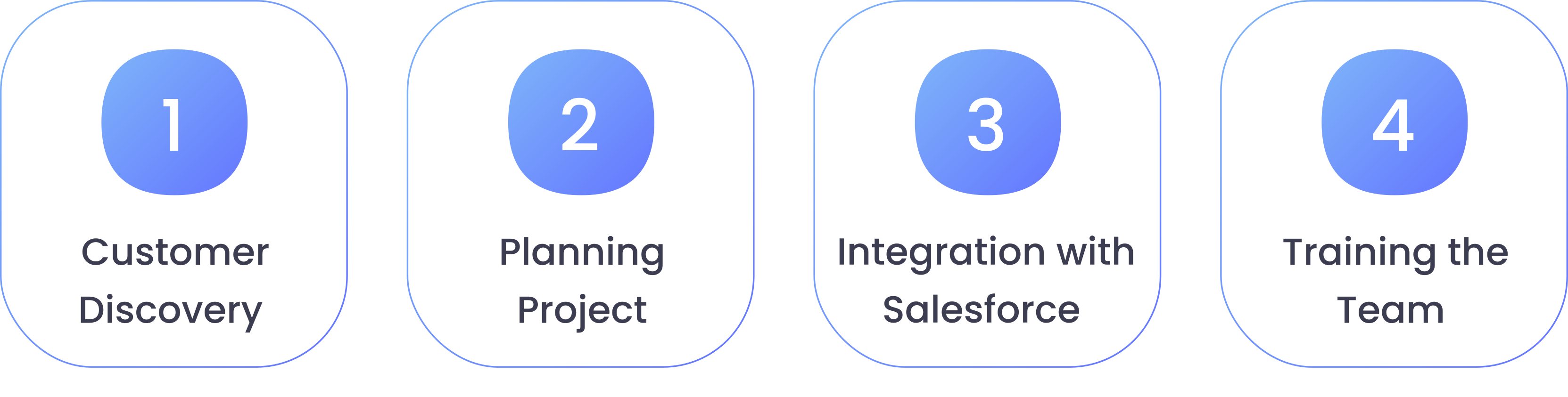
Step 1: Understanding how Grover works - Customer Discovery
We began by visiting Grover’s office in Berlin, where we spent a full day with the sales team. Rather than relying on assumptions, our goal was to observe directly how the team operated.
- What tools they used and how
- Where they got stuck in their daily tasks
- What frustrated them about their current setup
From this workshop, we identified 78 topics that needed to be implemented in HubSpot, including:
- Automatic lead assignment rules
- Conditional logic for different scenarios
- Required fields to ensure data quality
- Connections with third-party tools
- Custom record views
- Record forms with the right fields
- Automated tasks and follow-ups
- Sales sequences
- A training plan and onboarding documentation resources for the team
Step 2: Planning everything before we started
We gave Grover a detailed workbook that covered everything they needed to know before setting up HubSpot, and an estimation of how many resources and time were needed from their side to make the project a success.
The Basics:
- Email setup and domain connections
- User accounts and who gets access to what (mainly paid seats)
- Form creation/integration
Sales:
- How deals should move through different pipeline stages
- Rules for assigning leads to the right people
- Automated follow-up sequences
- Introduction and adoption of the Sales Workspace
Reporting:
- Team and individual reports including won deals by owner, forecasted closings, deals created, and open activities, among others.
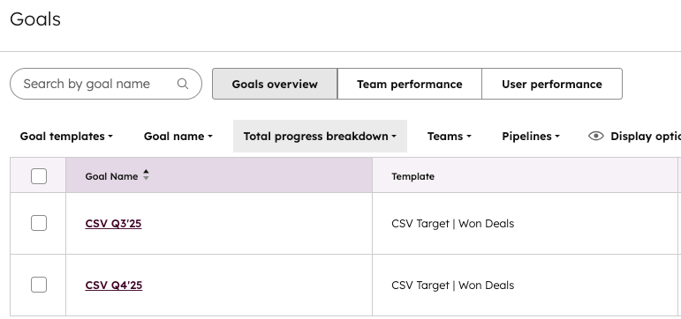
- Implementation of Goals to track sales reps’ quarterly performance for visibility and alignment with targets.
Connections:
- Integrating data from Salesforce to HubSpot (data dictionary)
- Connecting other tools
- Setting up reports and tracking
Making It Look Right:
- Grover's branding, colors, and fonts
- Email templates that match their style
Step 3: Integration with Salesforce
HubSpot has a built-in way to connect with Salesforce, but getting it right requires careful planning. Therefore, we provided a Salesforce-to-HubSpot mapping template to help define all relevant fields and specify which data syncs should be enabled. The next step was setting up the right permissions for the integration users - they need specific access levels in both systems to sync data properly.
Then we went through every single property from all objects (contacts, companies, deals) to check how they mapped between the two systems. Even though the systems try to match up data automatically, it's not always correct. For example, a "Phone" field in Salesforce might map to "Mobile Phone" in HubSpot when it should go to "Phone Number."
 We also had to decide on sync direction - some data needed to flow both ways, while other information should only sync from Salesforce to HubSpot or vice versa. This prevents data conflicts and ensures each system remains the source of truth for specific information types.
When records don't sync properly (which happens more often than you'd expect), you have to troubleshoot why and enable them manually in the record.
Step 4: Training the Team
We did hands-on workshops where everyone learned by actually using HubSpot. The training wasn't just theoretical - we made sure it was practical. We covered:
- How HubSpot terminology and concepts differ from Salesforce
- Finding their way around the new system and all its menus
- Using the sales workspace to manage leads and deals
- Setting up their email inbox integration
- Connecting their calendar and meeting scheduler
- Creating email signatures
- Using HubSpot's Co-pilot AI features throughout the entire platform
The focus was always on the sales features since that's what they'd be using every day.
Hypercare Phase: We set up weekly "power hour" calls to answer questions and fix any issues that came up once people started using HubSpot for real work. These sessions were crucial because you only discover certain problems and questions after you actually start using the system daily.
The Results
Time: Everything was done in just 3 months.
In the first phase, before they decided to continue running the integration for a while longer, we began the migration with approximately 29,000 deals, 92,000 leads, 21,000 contacts, and 19,000 companies imported. Naturally, for integrations where new data import isn’t required, data continues to sync back and forth, which happened once they opted to keep the integration active. In addition to the Salesforce integration, four other integrations were implemented with HubSpot.
How quickly people started using HubSpot:
50% of the team adopted the platform after the first training session,
70% within two weeks,
and 100% after just one month.
The Sales impact:
- Overall sales performance remained stable after the migration, showing no negative impact.
- The team adapted quickly to the new system, keeping deal flow and revenue steady during the change.
- Despite a reduction in team size later in the period, sales performance remained steady.
- This stability shows strong adoption, plus HubSpot effectively supports sales operations.
- Everything indicates a positive trend and potential growth in the coming months.
What's happening now: Everything is working smoothly, and we're still helping Grover as they think about adding marketing and customer service features.
What Changed for Grover
The difference was huge. Grover's sales team went from fighting with a slow, complicated system to having something that actually made their work easier. The fact that 100% of the team was using HubSpot within a month shows how much better it was.
Most importantly, we got it done fast. When a growing company like Grover needs results quickly, speed matters just as much as getting it right.
Success Factors
- Talk to the team first: Understanding how people actually work prevents big mistakes later
- Smart compromises work: When you can't change everything at once, find a way that works for now
- Show, don't tell: People learn faster when they practice with real examples
- Stay around to help: The best projects include support after everything goes live
Grover shows that even complicated sales changes can happen fast when you focus on what people actually need.
Considering a move from Salesforce but need guidance? We're here to help. Learn more about our Consulting Services.
Ready to get started?