HubSpot
How to build the 5 most important HubSpot reports for your business
Learn how to build 5 essential HubSpot reports step by step, from revenue attribution to campaign performance.
 Go to home
Learn how HubSpot reports help B2B teams track performance and growth, and discover why the 10 most important reports deserve a place on your dashboard.
The best HubSpot reports for B2B teams are the ones that track lead generation, pipeline health, conversion rates, revenue performance, and marketing ROI. These reports help businesses make data-driven decisions, improve forecasting, and align marketing and sales teams around shared goals.
However, not all reports provide the same value. While HubSpot offers hundreds of reporting possibilities, the most successful B2B organizations focus on a select group of reports that directly support growth and decision-making.
In this article, we'll explore what HubSpot reports are, why they matter, how to access them, and the key reporting areas every B2B team should be monitoring.

Table of contents:
HubSpot Reports are built-in analytics tools that transform the data stored in your CRM into meaningful insights.
They allow businesses to track performance across marketing, sales, customer service, and operations, helping teams understand what is working, identify bottlenecks, and uncover opportunities for improvement.
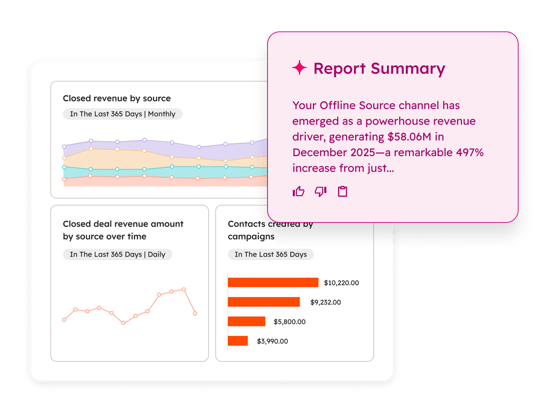
Instead of manually gathering data from multiple sources, HubSpot centralizes reporting in a single platform, making it easier to monitor business performance and share insights across teams.
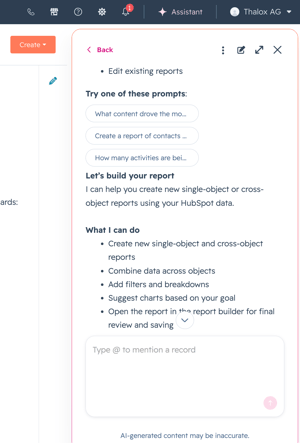
HubSpot also allows users to create reports with AI. By describing the report they want in plain language, HubSpot's AI assistant, Breeze, can automatically build the report, helping teams access insights faster and with less manual configuration.
How it works:
Read more about creating reports with AI
Data is only valuable when it helps drive action.
Without the right reporting framework, businesses often struggle to answer critical questions such as:
HubSpot Reports provide visibility into these questions, enabling teams to make informed decisions based on facts rather than assumptions.
Reporting gives leaders access to real-time insights that support faster and more confident decisions.
Shared dashboards help both teams work toward common objectives while using the same data source.
Reports allow businesses to monitor every stage of the customer journey, from first touchpoint to closed revenue.
Understanding pipeline performance and historical trends helps teams build more reliable forecasts and growth plans.
Clear reporting makes it easier to track progress, measure outcomes, and identify areas that need attention.
Accessing reports in HubSpot is simple:
Depending on your HubSpot subscription, you may also have access to advanced reporting features, custom report builders, attribution reports, and predictive analytics capabilities.
When working with HubSpot reporting, you'll often come across the terms reports and dashboards. While they are closely related, they serve different purposes and are designed for different levels of analysis.
A report focuses on a specific metric, dataset, or business question, while a dashboard brings multiple reports together to provide a broader view of performance.
The table below highlights the key differences:
| Reports | Dashboards |
|---|---|
| Focus on a specific metric, dataset, or question | Combine multiple reports into a single view |
| Provide detailed insights | Provide a high-level overview |
| Used for deeper analysis | Used for monitoring performance at a glance |
| Help answer specific business questions | Help track multiple KPIs in one place |
| Typically used by specialists and analysts | Often used by managers and leadership teams |
Think of reports as individual insights and dashboards as the executive summary that brings those insights together.
For example, a marketing manager may use a dashboard to monitor overall performance, while drilling into individual reports to understand campaign results, lead generation trends, or conversion rates in greater detail.
One of the biggest reporting challenges isn't having too little data, it's having too much.
Many teams build dashboards filled with dozens of metrics that look impressive, but provide little strategic value.
The result? → Teams spend more time reviewing numbers than taking action.
High-performing organizations focus on reports that help answer important business questions and influence decision-making. They prioritize quality over quantity and ensure every report serves a clear purpose.
Not all reports deserve a place on your dashboard.
While HubSpot offers hundreds of reporting options, the most effective B2B teams focus on a small number of reports that provide visibility into marketing performance, sales efficiency, customer satisfaction, and revenue growth.
The 10 reports featured in our ebook cover the three core areas of the customer journey:
While these report names provide an overview of what high-performing B2B teams track, understanding how to build them, which metrics to include, and how to turn the data into actionable insights is where the real value lies.
That's exactly what you'll find in The B2B HubSpot Reporting Playbook.
Inside, you'll discover:
✔ The purpose behind each report
✔ The key metrics and KPIs to track
✔ How to build each report in HubSpot
✔ Practical setup recommendations
✔ Tips and tricks
✔ Common reporting mistakes and how to avoid them
✔ Best practices for turning data into meaningful business insights
Whether you're in Marketing, Sales, or Customer Service, this guide will help you focus on the reports that matter most and get more value from your HubSpot data.
Learn how to build 5 essential HubSpot reports step by step, from revenue attribution to campaign performance.
Perform a HubSpot Health Check to identify data issues, optimize workflows, and improve reporting, ensuring your CRM drives the best results.
Clean up your HubSpot CRM with this step-by-step guide. We show you how to fix duplicates, standardize data, and rebuild segmentation for better...