Thalox
Sync your HubSpot & Dynamics ERP in 3 Steps
Optimize your business potential by syncing HubSpot and Microsoft Dynamics 365 ERP. Discover here how to integrate both systems in 3 steps.
 Go to home
Learn how to set up Buyer Intent in HubSpot step by step. Track high-intent companies, configure signals, and help your team focus on promising leads.
Understanding buyer intent is one of the most powerful ways to improve how sales and marketing teams prioritize leads. Instead of reaching out to cold prospects, buyer intent helps identify companies already researching solutions like yours, allowing your team to focus on the accounts most likely to convert.
With HubSpot Buyer Intent, businesses can track signals that indicate when a company is actively evaluating products or services. These signals come from website behavior, external research topics, and company activity. When configured correctly, buyer intent data can dramatically improve lead qualification, outreach timing, and conversion rates.
This guide explains how buyer intent works and how to set it up in HubSpot.
Table of concepts:
Buyer intent refers to behavioral signals that indicate a company is actively researching or considering a purchase or a service.
Some examples include:
These signals help sales teams identify which companies are moving closer to a buying decision, making outreach more relevant and timely.
Instead of relying only on form submissions or inbound leads, buyer intent allows you to detect early-stage interest from companies that haven't contacted you yet.
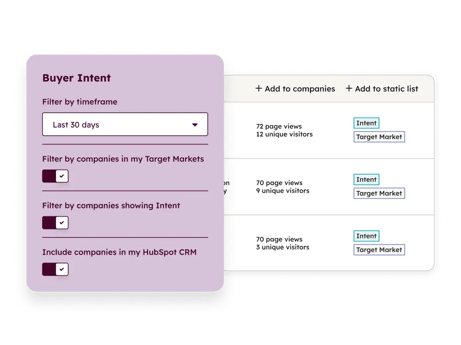 Source: HubSpot
Before configuring buyer intent, several requirements must be in place.
Buyer Intent is available with any of the following subscriptions:
These features allow companies to track external research signals and advanced intent data.
A strong Ideal Customer Profile (ICP) ensures that intent signals come from the right companies.
Your ICP should include:
Without this definition, intent tracking may capture irrelevant companies that are unlikely to become customers.
Buyer intent relies heavily on website engagement data.
Make sure the HubSpot tracking code is installed across all pages of your website. This allows the platform to monitor visitor behavior such as:
These signals are crucial for identifying companies that repeatedly interact with high-intent pages.
To configure buyer intent, you must have administrator permissions in HubSpot. Admin access allows you to:
Before setup begins, decide which behaviors indicate strong purchase intent.
Common high-intent signals include:
You should also define frequency thresholds, such as:
Example: A company visiting product pages three or more times within 30 days.
Step 1 – Define Target Markets
Step 2 – Set Intent Criteria
Step 3 – Configure Intent Signal types
Step 4 – Exclude Existing Customers
Step 5 – Configure Credit Limits
Step 6 – Automate Company tracking
Step 7 – Save views and configure Email Digests
Step 8 – Monitor and refine your Setup
Step 9 – Optional Automation with Workflows
Grab the ebook for a full setup guide, step-by-step detailed instructions, real-world examples, and a setup checklist to simplify the process.
Buyer intent helps organizations move from reactive lead generation to proactive opportunity discovery.
Benefits include:
Instead of contacting every prospect, teams can focus on companies already demonstrating real interest.
Buyer intent is one of the most valuable capabilities within HubSpot for modern sales and marketing teams. By identifying companies actively researching solutions, organizations can prioritize outreach, personalize messaging, and increase the likelihood of conversion.
When configured properly with clear ICP definitions, meaningful intent signals, and automated tracking, buyer intent transforms how teams discover and engage their most promising prospects.
Optimize your business potential by syncing HubSpot and Microsoft Dynamics 365 ERP. Discover here how to integrate both systems in 3 steps.
Learn how to efficiently create and manage quotes in HubSpot with this comprehensive step-by-step guide.
Learn what you need to sync WhatsApp to HubSpot, how the setup process works, and get our free step-by-step slide guide.