

Skip to content
Logo Thalox

How to change the account owner?

How to change the account owner? - Collaboration

 
Only the current account owner can transfer the role of the account owner to a different team member. To transfer the account ownership, the account owner needs to log in and navigate to “My Team”.
 
Identify the new Owner within existing team members or invite a new team member.
In the Action column, click on the three dots, and the permission options will appear. Select “Make owner”. 
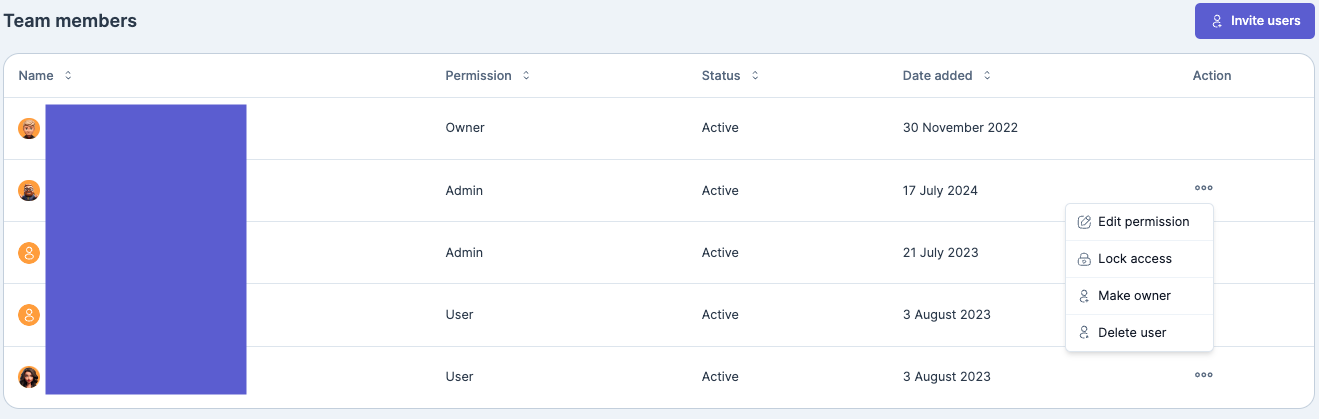
 
change-account-owner
 
A newly invited member must first accept the invitation on their email before you can transfer the ownership. Once they accept the invite you'll see a status change on your team member.
 
Updated April 2026
What is the main difference between the thalox team member roles?

The main difference between the thalox team member roles is the level of responsibility and account control: Members operate the platform and run predictions, Admins manage users in addition to operational tasks, and the Owner has full account control, including billing access and ownership transfer.

What is thalox and what does it do?

thalox is a lead scoring and automatic contact segmentation tool that uses AI to predict the likelihood of contacts engaging with your email campaigns. It organizes your database into actionable segments directly within HubSpot. 

How do I change a team member’s role in thalox?

1. Navigate to “My Team” in your thalox account.
2. Locate the team member whose role you want to change.
3. Click “Edit permissions” next to their name.
4. Select the new role from the available options (Member, Admin, or Owner).
5. Save your changes, the new role will take effect immediately.