

Inconsistent, incomplete, or duplicated property values are among the most common issues in HubSpot portals. Left unaddressed, they break segmentation, cause workflows to trigger incorrectly, and make reporting unreliable.
Thalox Suite offers two tools to help you identify and resolve these issues: Profiler for diagnosing data quality, and Normalizer for standardizing property values at scale.
Common HubSpot data problems
-
Inconsistent property values
Open text fields in HubSpot often accumulate multiple variations of the same value over time, through manual entry, imports, or integrations. For example:
- Country: "United States", "US", "U.S.", "USA"
- Job title: "VP Sales", "Vice President of Sales", "Head of Sales"
These variations are treated as distinct values by HubSpot, which means filters, segments, and workflows built on these properties will produce incomplete or inaccurate results.
-
Low fill rates
Custom properties are frequently created but not consistently populated. A property with a low fill rate adds noise to your data without contributing to segmentation or analysis.
-
No visibility into data quality
Without a structured overview, it's difficult to know which properties are reliable and which ones need attention before building campaigns or automations on top of them.
How Thalox Profiler helps
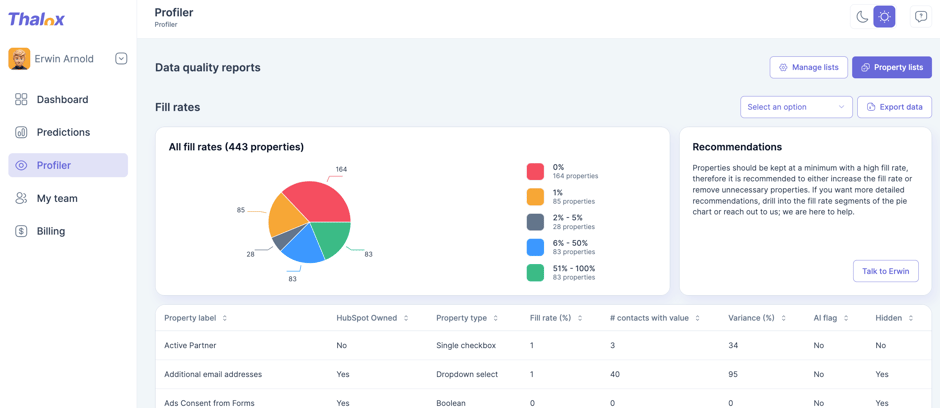
Profiler gives you a data quality report across your HubSpot contact properties. For each property, you can see:
- Fill rate: the percentage of contacts with a value in that field
- Variance: the spread of different values stored
- Property type: whether it's a standard or custom field
- AI flag: whether the field is used in the Thalox Engagement Score calculation
You can filter by standard fields, custom fields, or saved presets (called lists) that you define yourself. This makes it easy to focus your analysis on the properties most relevant to your current work.
The Contact Detail section also tracks how many contacts have a valid email address and complete name fields, with an evolution over time, useful for monitoring the results of progressive profiling efforts.
Recommended use: Run Profiler before building new segments or automations to confirm that the properties you're relying on are sufficiently filled and consistent.
How Thalox Normalizer helps
Normalizer lets you clean and standardize inconsistent property values and sync them back into HubSpot as a new, ready-to-use property.
How it works:
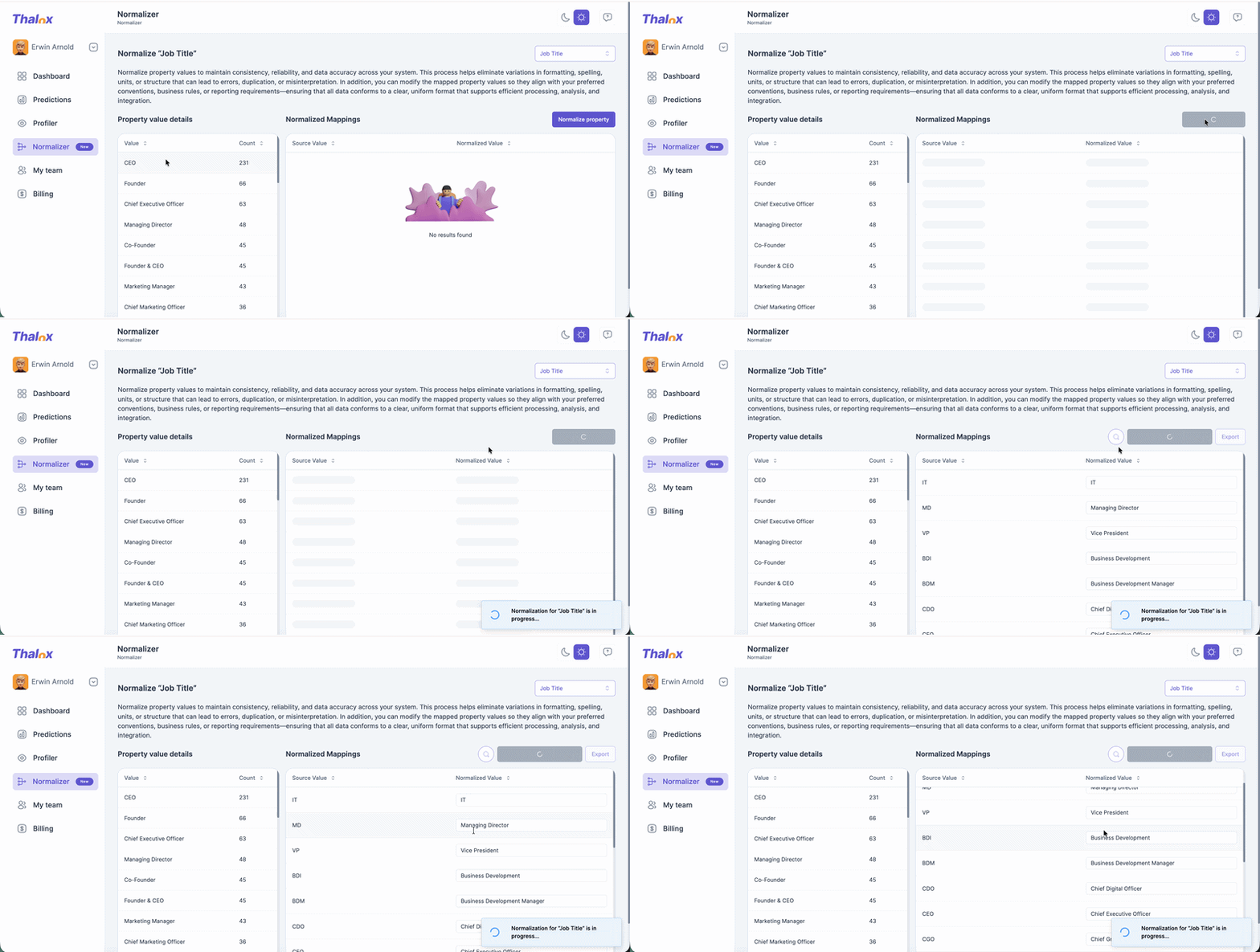
- Select an open-text property to normalize (for example, Job Title or Country).
- Normalizer runs its algorithm and suggests a standardized value for each variation it finds.
- Review the suggested mappings and edit any that don't match your conventions.
- Click Create normalized property.
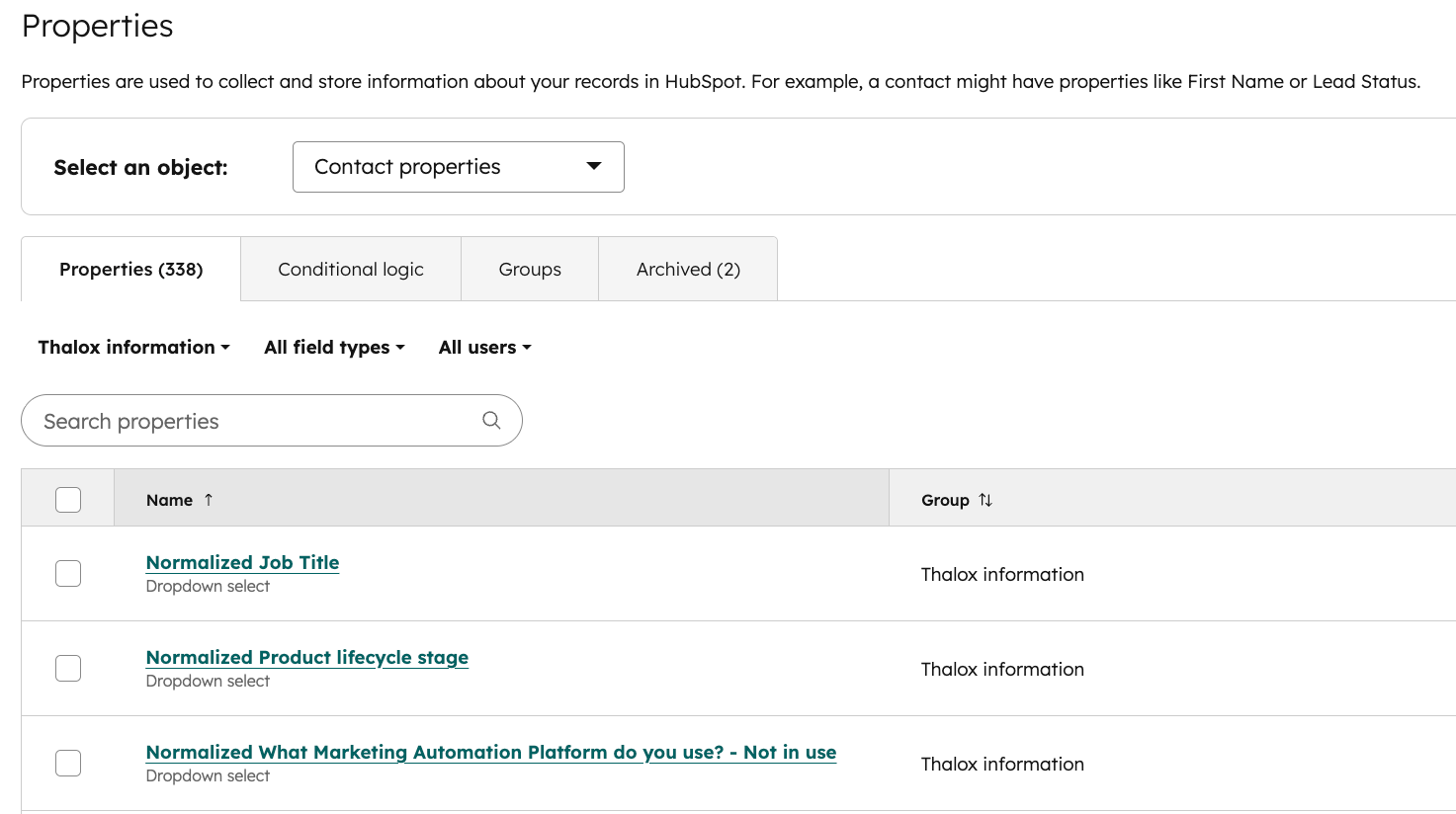
A new property called "Normalized [Property name]" is created in HubSpot under a property group called "Thalox Information," as a dropdown (select) field type. Your original data remains unchanged.
You can also export the full mapping as a CSV file.
Example: Country field
A portal with five variations of "Germany" ("Germany", "DE", "Deutschland", "GER", "de") can normalize all of them into a single value. Geo-targeted campaigns and regional reports will immediately become more accurate.
Example: Job title field
A team targeting Heads of Marketing may have "Marketing Director", "VP Marketing", "Head of Marketing", and "Head Marketing" across their database. After normalizing the job title field, segmentation is consistent and the right contacts are included in every campaign.
Using Profiler and Normalizer together
Profiler and Normalizer are designed to work as a sequence:
- Use Profiler to identify which properties have high variance or low fill rates.
- Use Normalizer to standardize the values in those properties.
- Build your segments, workflows, and reports on the normalized properties in HubSpot.
This approach moves you from identifying data quality issues to actively resolving them, without manual cleanup in HubSpot.